 Skip to content


Large LCD bonding starts feeling different once the panel reaches 55 inches or above. The glass becomes heavier, edge pressure becomes harder to control, and even the walking space beside the machine can affect alignment. A stable Large Format Bonding Machine workflow is not just about stronger vacuum pressure. It is about support, loading direction, fixture balance, bubble release, and final inspection.
Quick Navigation
Selection Logic
Start from the defect pattern first. Then check panel size, glass thickness, edge frame, fixture flatness, adhesive type, and debubble needs.
Why 55-86 Inch Displays Need a Different Bonding Plan
Large LCD bonding problems often begin before the vacuum chamber closes. Two people lift the panel. One side lands slightly earlier. The glass flexes a little near the center. At first, everything still looks fine. Then, after a few hours, a faint edge bubble appears near the bezel.
This happens because large panels magnify small handling errors. A small pressure change that may not matter on a phone screen can become visible on a 75-inch display. Therefore, oversized bonding needs a slower and more controlled process.
The first principle is simple: support comes before pressure. If the panel is not sitting evenly, stronger vacuum will not fix the real problem. It may only press the defect more deeply into the adhesive layer.
A proper Large Format Bonding Machine setup should make the panel easier to support, easier to align, and easier to inspect after bonding. Speed matters, but stable results matter more.

In real workshops, fatigue also matters. After several large panels, gloves collect dust, suction cups leave light marks, and alignment corrections become slower. That is why large-format work should be treated like precision assembly, not just a bigger version of phone repair.
Another detail appears during panel transport. Many workshops focus heavily on machine specifications while ignoring surrounding movement space. Then the first 86-inch curved panel arrives. Suddenly two people struggle to rotate the glass beside a narrow table edge. One accidental touch creates contamination immediately.
So the better question is not only “can the machine fit this size?” A better question is: can the panel be loaded, aligned, supported, laminated, removed, cooled, inspected, and moved again without new stress being introduced at every step?
Common Large-Format Defects Buyers Should Expect
Large LCD defects usually follow clear patterns. Edge bubbles often appear several hours after lamination. Pressure marks usually come from uneven support. Random dust points often suggest weak cleaning control during loading.
The most common mistake is blaming the adhesive too early. In many cases, the adhesive is only showing the problem. The real cause may be uneven frame thickness, fixture imbalance, poor air-release path, or glass flex during placement.
Typical Large LCD Bonding Problems
- Edge bubbles after several hours
- Pressure marks near fixture support points
- Dust contamination under dark display scenes
- Alignment drift during glass placement
- Corner lifting near thick bezels
- Curved glass stress during vacuum release
Edge bubbles usually tell a story. If bubbles stay near the same corner, the fixture may be uneven. If bubbles appear along a long edge, the frame may be too thick or air may not have a clean path to escape. If bubbles appear randomly, cleaning conditions or adhesive handling may be the stronger suspect.
Curved glass needs special attention. The pressure does not spread in the same way as flat glass. Increasing vacuum pressure may look like a quick fix, but it can also create haze or pressure marks. The better approach is usually stable support first, then controlled debubble processing.

Dust control also becomes harder as display size increases. A tiny particle on a phone screen may stay invisible. On a black 75-inch LCD panel, the same particle stands out immediately during dark-scene inspection.
That is why experienced repair teams usually slow down before final placement. The extra twenty seconds spent checking reflections and edge cleanliness often saves several hours of rework later.
Working Area, Loading Direction and Fixture Support
Machine size alone does not decide whether the process will be stable. The working area around the machine matters too. If two operators cannot rotate the panel smoothly, the risk of corner contact, dust contamination, and alignment shift increases.
Fixture support is even more important. Large glass can bend slightly if support points are uneven. The bending may be tiny, but during vacuum lamination it changes adhesive flow. This is one reason large-screen lamination needs a flat and balanced support structure.
A practical check is simple: place the panel, stop for ten seconds, and inspect whether the edge sits evenly before bonding. If one side needs hand correction every time, the fixture or loading direction should be reviewed.

Loading direction also deserves attention. Side loading may work well for medium screens. However, wider panels often need a smoother front-loading path so that the glass does not twist during placement.
CCD alignment may also be useful when panel edges must line up tightly across a wide surface. Not every job needs it. However, if manual positioning keeps drifting near the corners, alignment assistance becomes worth considering.
Another practical issue appears during long production runs: gloves. After several hours of handling adhesive materials, anti-static gloves slowly collect residue near the fingertips. Operators often do not notice immediately. Then faint drag marks appear along the edge of dark glass.
Large-format workflows magnify small habits. That is one of the biggest differences between oversized LCD bonding and ordinary phone repair.
When Bubble Removal Becomes Necessary
Some large LCD panels look clean right after lamination. Then haze points or small bubbles appear during final inspection. This usually means trapped air remained inside the adhesive layer.
Large displays need longer air-release paths. The distance from the center to the edge is much greater than on small screens. Therefore, a bubble removal stage can be more useful than simply increasing pressure during lamination.
Debubble Processing Helps Most When
- The panel size is above 55 inches
- The display uses curved cover glass
- The edge frame is thick or uneven
- OCR adhesive needs extra stabilization
- Side-light inspection shows delayed bubbles
- Production needs repeatable QC, not one-time repair luck
Inspection lighting also matters. Overhead light often misses edge defects. Side-angle inspection shows trapped air much earlier. In many workshops, simply changing the inspection angle reveals the real problem pattern.
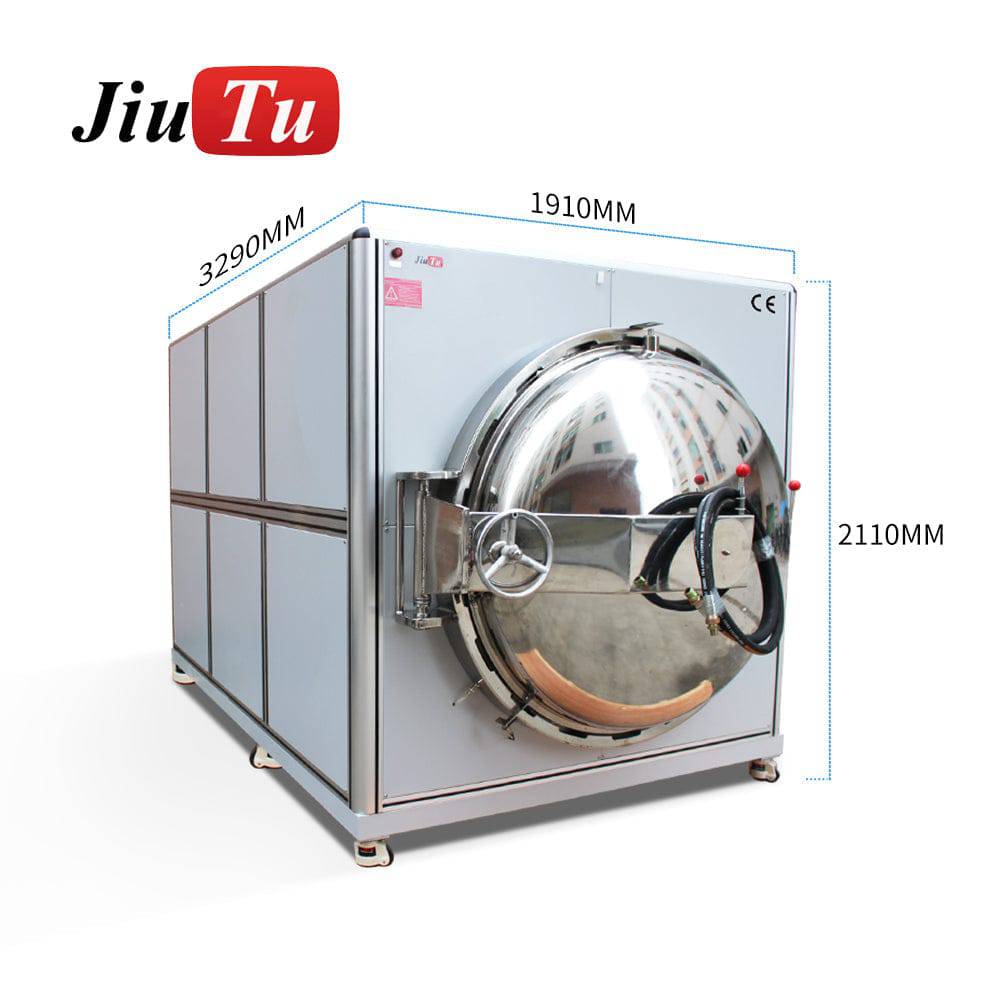
The key is not to treat debubble as a rescue step only. It should be part of the normal process design when the panel is large, the adhesive layer is thick, or the frame structure makes air release difficult.
In other words, lamination and bubble removal should be planned together. If the lamination stage pushes air toward the edge but the debubble stage is not suitable for the panel size, delayed bubbles may still appear.
Pre-Purchase Checklist for Large Format Bonding
Before choosing equipment, the better question is not only “what size can it handle?” The better question is “where does the current process fail?” That answer usually gives a clearer equipment direction.
Large LCD Bonding Checklist
- Measure actual panel dimensions, not only screen size
- Check glass thickness and bezel structure
- Confirm whether curved glass is involved
- Review dust control during busy working hours
- Check walking space around the equipment
- Inspect fixture flatness and support balance
- Confirm OCA or OCR adhesive type
- Collect defect photos before setup matching
- Decide whether CCD alignment is needed
- Plan debubble processing before scaling volume
Defect photos are especially useful. Corner bubbles usually suggest support imbalance. Random dust clusters often point to cleaning or airflow problems. Center haze may indicate pressure or adhesive-flow inconsistency.
Daily quantity also matters. A workshop processing one or two panels per week may accept a slower manual routine. A production line handling repeated display batches needs more predictable loading, fixture and inspection steps.
For setup planning, JiutuStore can match panel size, glass thickness, adhesive type, daily quantity and defect photos with a more suitable bonding direction.
FAQ
Does every 65-inch project require a Large Format Bonding Machine?
Not always. However, repeated edge bubbles, unstable alignment and support-related pressure marks usually mean a dedicated Large Format Bonding Machine workflow will be more stable.
Why do edge bubbles appear hours after lamination?
Large panels release trapped air slowly. Uneven frame thickness, weak support, and incomplete air-release paths can make bubbles appear after pressure stabilization.
Is stronger vacuum pressure always better?
No. Excessive pressure can create pressure marks or adhesive distortion. Stable fixtures and proper debubble timing often help more than simply increasing pressure.
When is CCD alignment useful?
CCD alignment becomes useful when large glass edges must align tightly and manual placement keeps drifting near corners or long edges.
What should be prepared before asking Jiutu for setup matching?
Panel size, glass thickness, adhesive type, daily quantity, fixture photos and defect photos will make the recommendation much more accurate.
Large LCD bonding usually fails in small details first.
Glass handling, fixture support, edge pressure, air-release timing and inspection lighting affect oversized panels more than most specification sheets suggest. Stable results come from process matching, not just stronger pressure.
For oversized LCD projects involving OCA, OCR, curved glass, edge bubbles or large-panel handling, ask Jiutu to match panel size, glass thickness, adhesive type, daily quantity and defect photos with a suitable setup.