

Vacuum Laminating Machine for Tablets: Mold-Free vs Mold Setup
A tablet screen does not forgive a rushed lamination job. A small bubble, a light edge shift, or one dust point can stand out clearly on a large iPad panel. For repair benches, refurbishment teams, and industrial display module work, the real question is simple: should the process stay flexible with mold-free operation, or become more repeatable with a mold setup?
Why Tablet Lamination Feels Different From Phone Screen Work
A vacuum laminating machine may look like a simple press from the outside. In real tablet OCA work, however, the process feels very different from a small phone screen repair. The glass is wider, the screen area is easier to inspect, and the operator has less room for casual handling.
For example, a tiny air mark near the edge of a phone screen may pass after bubble removal. On a 10-inch or 12.9-inch tablet screen, that same mark can appear clearly under a white test image. This is why tablet work often feels slower, even when the machine cycle itself is quick.
There is also a different kind of pressure at the bench. A tablet panel is larger, more expensive to rework, and harder to pick up cleanly. One small touch on the adhesive side can turn into a visible defect after lamination.
So, the setup decision should not begin with a long parameter list. It should begin with the working scene: mixed tablet repair, repeated iPad refurbishment, or industrial display bonding.
 View 16 Inch iPad Tablet Laminator
Applicable Scene Comparison: Mold-Free vs Mold Setup
Mold-free operation and mold setup are not just two ways to hold a screen. They create two different working rhythms. Mold-free work gives flexibility. Mold setup gives repeatability.
The clear position is this: mold-free work is better for mixed tablet repair and early testing. Mold setup is better when the same tablet model appears again and again.
Mold-Free Work: Better for Mixed Tablet Jobs
Mold-free operation fits a bench where the next panel is not predictable. One morning may start with an iPad Mini. After lunch, a Samsung tablet may arrive. Later in the day, a small display module may need a sample test.
In that type of work, preparing a dedicated mold for every model slows the bench down. A flexible plate and a careful loading habit are often more practical.
However, mold-free does not mean careless. The operator still needs clean placement, steady hands, and a repeatable edge-checking method. A tablet panel should not be lifted and repositioned several times after the OCA film is exposed.
Mold Setup: Better for Repeated iPad or Tablet Batches
Mold setup makes more sense when the same screen model repeats through the day. For example, a refurbishment line processing one iPad size for several hours needs stable placement more than flexibility.
The mold helps reduce small differences between operators. One person may align by the top edge, while another watches the lower corner first. Across a batch, those small habits can create visible variation.
Still, a mold is not a cure for every issue. It must match the glass, stay clean, and avoid uneven pressure at the edge. A dirty mold can repeat the same defect again and again.
| Decision Point | Mold-Free Workflow | Mold Setup Workflow |
|---|---|---|
| Best scene | Mixed tablet models, sample tests, flexible repair benches | Repeated iPad models, batch refurbishment, stable model flow |
| Setup speed | Faster when models change often | Slower before production, faster after setup |
| Main strength | Flexible handling and lower fixture cost | More repeatable positioning |
| Main risk | Edge shift or inconsistent hand placement | Wrong mold, dirty mold, or poor fit |
How a Vacuum Laminating Machine Changes Tablet OCA Repair Results
A vacuum laminating machine affects the tablet result in a very direct way. It controls how air leaves the bonding area, how pressure settles across the screen, and how evenly the OCA layer contacts the glass and LCD.
In phone repair, small process differences are sometimes hidden by the smaller screen size. In tablet work, those differences become visible. A slight pressure imbalance may show near a corner. A weak vacuum stage may leave a thin air line at the edge.
This is why the machine should be judged together with the workflow. A good machine cannot fix a dusty bench or rushed loading. At the same time, a careful operator still needs stable vacuum, enough plate space, and predictable pressure control.
 View OCA Vacuum Laminator
Core Process Details That Matter More Than a Spec Sheet
Parameter lists are useful, but they do not tell the whole story. Tablet lamination fails in practical ways: bubbles, dust points, uneven edges, weak adhesion, visible shift, or pressure marks.
So, each parameter should be connected to a real workshop symptom. That makes the selection much easier.
Working Area: Do Not Let the Screen Barely Fit
A tablet panel needs room around the glass. If the panel barely fits on the plate, the operator has no comfortable space for loading, checking, or unloading.
This is especially important with iPad panels. A screen may technically fit by size, but the handling may still feel tight. Once the hands feel forced, the chance of dust or edge shift goes up.
Therefore, plate size should be judged by usable margin, not only maximum inch support.
Vacuum Stability: Air Should Leave Before Pressure Locks the Stack
Vacuum stability matters because trapped air needs time to leave the bonding area. If the cycle pulls unevenly, small air pockets may stay near the edge or center.
On a tablet screen, those small air pockets are easier to notice. A bright white test image will show defects that may be missed on a smaller display.
For this reason, the lamination cycle should feel calm and repeatable. Aggressive movement is not the goal. Stable bonding is.
Pressure: More Force Is Not Always Better
Pressure brings the OCA, glass, and LCD together. However, too much pressure can create marks or stress a fragile panel. Too little pressure can leave weak bonding near the edge.
A simple inspection habit helps. After the first test run, check the screen under white, black, and grey images. Then look at all four edges from an angle.
If the same corner fails twice, the issue is probably not luck. It may be placement, plate level, pressure, or mold fit.
Alignment: Visual Positioning, Mold, or CCD
For mixed repair work, visual alignment or mold-free handling can be enough when the operator has a steady routine. For repeated models, a mold can reduce daily variation.
For industrial display modules, alignment often becomes more serious. A narrow visible window or custom cover glass leaves less tolerance for manual guessing.
In that case, a CCD vacuum laminating machine can support more accurate positioning for display module work.
 View CCD Vacuum Laminating Machine
Cost and Yield: The Expensive Part Is Usually Rework
Machine price is easy to compare. Rework cost is easier to overlook. In tablet OCA lamination, one failed panel may need separation, cleaning, new OCA film, another cycle, and another inspection.
That can take 30 to 60 minutes on a busy bench. During that time, several smaller repairs could have moved forward. So, yield should be measured in time as well as materials.
Mold-Free Cost Pattern
Mold-free work lowers fixture cost. It suits repair rooms where tablet models change often and volume is not always predictable.
However, the saved mold cost should not become an excuse for loose handling. Clean mats, dust tools, test panels, and a written settings sheet are still needed.
The strongest mold-free workflow is not the fastest one on day one. It is the one that becomes steady after a few repeated runs.
Mold Setup Cost Pattern
Mold setup adds preparation cost, but it can reduce alignment variation. This is useful when the same iPad or tablet model repeats many times in one shift.
Still, mold setup only makes sense when repetition is real. If a model appears once a month, the mold may sit unused while the actual problem remains dust control or pressure adjustment.
A practical rule is simple: when the same model repeats weekly and alignment causes rework, mold setup deserves attention.
Selection Checklist Before Confirming a Tablet Lamination Setup
Before choosing a mold-free workflow, mold setup, or CCD solution, the team should look at the actual work pattern. This checklist keeps the decision practical.
- Measure the largest tablet glass handled in the last 30 days.
- Check real glass size, not only the tablet model name.
- Separate weekly tablet volume from phone screen volume.
- Mark which models repeat and which models appear only once.
- Review whether most failures come from dust, bubbles, shift, or pressure marks.
- Use mold-free work when model changes are frequent.
- Use mold setup when the same model repeats in batches.
- Consider CCD alignment when cover glass or display windows need tighter positioning.
- Run damaged test panels before valuable screens.
- Record pressure, vacuum time, heating, bubble removal time, and inspection results.
A Practical Tablet OCA Workflow That Reduces Mistakes
A good workflow removes panic from the moment the adhesive is exposed. The panel should not be waiting in the air while tools are being searched for. The clean area should already be ready.
The following routine is simple, but it solves many daily problems.
Before Lamination
Check the panel under a clean light. Look for scratches, edge chips, stains, weak backlight, and flex cable issues before OCA film work begins.
Then prepare the bench. Gloves, wipes, dust removal tools, test images, and alignment references should be ready before the film liner comes off.
During Lamination
Load the panel once, then check twice. First check the top and bottom edge. Then check the corner distance. If the panel must be lifted again, clean again before running the cycle.
Also, avoid touching the machine table during the early part of the cycle. In a cramped room, even a small bump can shift a large panel.
After Lamination
Inspect the screen with white, black, and grey images. White shows dust and haze. Black reveals pressure marks. Grey often shows uneven bonding more clearly.
Finally, record the result. After 10 or 20 panels, those small notes become more useful than memory.
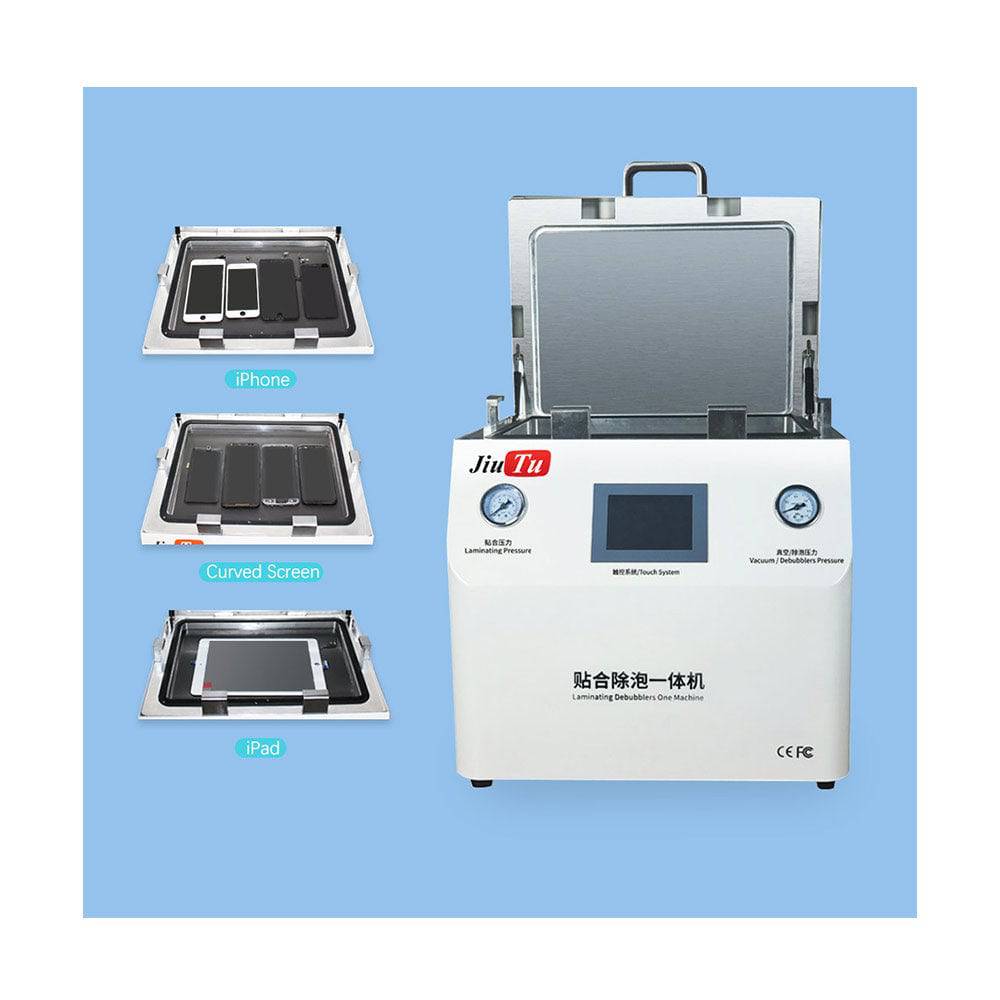 View Vacuum Laminating Machine
Common Mistakes in Tablet Lamination
Most tablet lamination problems come from small habits. The screen is larger, so those habits become more visible.
These mistakes are worth checking before changing equipment or blaming the OCA film.
Choosing by Inch Size Only
A machine may support a certain size on paper, but the panel still needs space around the edge. If the screen barely fits, loading becomes stressful.
Usable plate margin is more important than a simple size number.
Copying Phone Settings
Phone settings do not always transfer well to tablet work. A larger screen changes how air moves and how pressure appears across the surface.
Tablet panels should have their own settings record.
Skipping Edge Inspection
The center of the screen may look clean while one edge remains weak. This is common when pressure, mold fit, or placement is not balanced.
A 30-second edge check can prevent a long rework cycle.
FAQ: Tablet OCA Lamination and Setup Selection
Is mold-free lamination reliable for iPad repair?
Yes, mold-free lamination can be reliable when the workflow is clean and the operator follows a steady loading routine. It is more suitable for mixed tablet models and lower-volume repair work.
When should a mold setup be used?
A mold setup should be considered when the same tablet model repeats often. It helps reduce alignment variation and makes the process easier to repeat across a batch.
What causes bubbles after tablet lamination?
Bubbles often come from dust, weak vacuum timing, poor OCA placement, uneven pressure, or rushed loading. Bubble removal helps, but the first lamination stage should already be controlled.
Does every tablet workflow need CCD alignment?
No. Many repair benches can use visual alignment or mold setup. CCD alignment is more useful for industrial display modules, custom cover glass, and narrow visible windows.
How should a new tablet model be tested?
Use a damaged but usable panel first. Record pressure, vacuum time, heating, OCA type, and bubble removal settings. Then inspect the result under white, black, grey, and angled edge light.
Ask Jiutu for a Tablet Lamination Setup Recommendation
Tablet OCA work becomes easier when the machine, panel size, and workflow match each other. Mold-free operation suits mixed repair work. Mold setup suits repeated tablet models. CCD alignment supports industrial display modules and tighter positioning needs.
For a clearer recommendation, send Jiutu the tablet model, glass size, weekly repair volume, OCA process, and whether CCD alignment is needed. Jiutu can suggest a suitable quotation, sample machine option, or adaptation plan based on the actual workflow.
- Choose mold-free work when tablet models change often.
- Choose mold setup when the same model repeats in batches.
- Choose CCD alignment when display windows or cover glass require tighter positioning.