

OCA Laminator vs Vacuum Laminator: Which Setup Fits Phone and Tablet Repair?
For phone screen refurbishment, tablet glass bonding, and LCD module repair, the difference between an OCA laminator and a vacuum laminator becomes clearer when the process is judged by air control, fixture support, panel size, pressure stability, and post-lamination bubble removal.
Quick Navigation

In many repair rooms, the terms sound similar. However, an OCA laminator mainly focuses on bonding optical adhesive layers, while a vacuum laminator adds air extraction before pressure finishes the bond. Therefore, screen size, glass structure, fixture accuracy, and bubble behavior should guide the setup.
For a practical starting point, Jiutu’s OCA vacuum laminator page shows a large-format machine route for LCD screen lamination, touch digitizer bonding, front glass work, car navigation displays, computer screens, and customized display applications.
What an OCA Laminator Does
First, an OCA laminator bonds display layers with optically clear adhesive. OCA means “optically clear adhesive,” a transparent adhesive layer used between cover glass, touch panels, LCD modules, polarizer film, or related display parts. As a result, the machine helps create controlled contact between layers instead of relying on hand pressure.
In phone repair work, the value is repeatability. A technician can load a known model, position the glass, align the adhesive, and apply pressure in a controlled sequence. Meanwhile, the fixture keeps the panel from shifting during the most sensitive part of the process.
However, the machine is only one part of the result. Dust control, film peeling angle, fixture cleanliness, OCA storage, panel flatness, and inspection lighting still decide whether the screen leaves the bench clean. In other words, a laminator supports the workflow; it does not hide poor preparation.
For general adhesive handling context, iFixit’s custom-cut adhesive application guide also emphasizes surface preparation, liner removal, careful alignment, and even pressure. Although repair equipment workflows are different from DIY adhesive strips, the same principle still applies: clean preparation and controlled pressure matter before the final bond.
Where This Setup Fits
For repeated phone glass replacement, a compact OCA workflow can be efficient. The panels are smaller, the fixtures change quickly, and the same models appear often. Therefore, the process can stay fast when cleaning, alignment, pressure, and inspection are standardized.
For tablet work, the same idea becomes more demanding. Larger glass exposes small dust points, corner lift, edge haze, and alignment drift more easily. So the decision should not stop at “can the machine press the screen.” It should ask whether the whole stack can sit flat, land evenly, and pass inspection after cooling.
What a Vacuum Laminator Adds
Next, a vacuum laminator adds air extraction to the bonding process. The screen stack enters a sealed working area, then air is removed before pressure completes the lamination. Because trapped air has less chance to remain between layers, the result can be more stable on wider panels and mixed display jobs.
The Jiutu 9TU-M063 product page describes a large vacuum lamination machine for LCD screens under 35 inches. It lists a 600×900mm lamination area, customized mold needs based on the actual product, 25–40 seconds per working cycle, PLC control, touch-screen settings, upper and lower heating up to 100°C, platform balance adjustment, maximum pressure up to 1.2 tons, and cylinder-driven action.
However, those numbers should be treated as model-specific information, not a universal rule for every screen. Settings still depend on panel type, adhesive layer, glass thickness, mold support, edge structure, and repair target. Therefore, uncertain details should be confirmed with real screen information before final configuration.
Simple Process Difference
| Process Point | OCA Laminator | Vacuum Laminator |
|---|---|---|
| Main role | Bonds OCA film, glass, touch panel, or LCD layers with pressure. | Removes air in a sealed area before pressure completes bonding. |
| Best fit | Repeated phone models, smaller panels, stable fixture routine. | Tablet screens, larger LCD panels, car displays, and mixed display work. |
| Air control | Depends heavily on loading, alignment, adhesive placement, and later bubble removal. | Adds vacuum extraction to reduce trapped air before full pressure. |
| Still needs | Clean film handling, fixture support, inspection, and defoaming when needed. | Correct mold, stable pressure, clean loading, and post-lamination checks. |
Why Vacuum Helps Larger Screens
For phone panels, trapped air has a smaller surface to travel across. Meanwhile, tablet screens, iMac-style panels, computer displays, and car navigation screens create wider contact zones. Because the adhesive has more area to settle, vacuum support can reduce the chance of visible air pockets.
Still, vacuum is not a rescue step for every defect. Dust dots, pressure marks, poor edge support, and panel shift usually start before the chamber closes. Therefore, the best result comes from vacuum, mold support, pressure control, and inspection working together.
Screen Size, Fixture and Bubble Control Differences
Screen size is the easiest difference to see. However, it is not the only one. A panel that physically fits the plate may still fail if the fixture does not support the corners, the glass rocks during loading, or the working clearance is too tight for safe placement.
For phones, the process often values speed and repeatability. A technician handles many small screens, so fixture cleaning, fast loading, and clear inspection rules matter. By contrast, tablet and larger LCD jobs need more attention to long edges, cover glass thickness, panel flex, and corner support.
Phone Screen Work
Usually needs fast fixture changes, clean OCA film handling, accurate placement, and consistent pressure. Also, edge OLED models may need careful support near curves and FPC exits.
Tablet Screen Work
Usually needs wider loading space, stronger flatness control, better corner support, and a clear bubble-removal routine after lamination.
Mixed LCD Modules
May include computer displays, car navigation screens, industrial panels, and customized glass. Therefore, mold planning becomes a central decision.
Bubble Control
Starts with cleaning and loading. After lamination, a pressure chamber or bubble remover may still be needed for residual air and edge bubbles.
Fixture Support Can Decide the Result
In many failed samples, the fixture is the quiet cause. One side may sit too high. A corner may lack support. A hard edge may press the glass at the wrong point. As a result, the finished panel can show edge haze, silver lines, or pressure shadows even when the machine runs normally.
For customized panels, the mold should match the actual glass and module shape. The Jiutu product page also notes that customized molds are necessary based on the actual product. Therefore, non-standard panels should never be judged only by diagonal size.
Bubble Removal Is Usually a Workflow Step
Bubble control should begin before lamination. First, clean the glass and LCD surface. Next, keep OCA film covered until the stack is ready. Then, align the layers and close the chamber without unnecessary delay. After that, inspect the panel under white, black, gray, and side-light conditions.
If small bubbles remain after bonding, a pressure chamber can help finish the adhesive. For deeper detail on this step, the Jiutu guide on High Pressure Bubble Remover for OCA Lamination explains how defect type, pressure, heat, cooling, and fixture support affect final results.
Recommended Jiutu Equipment
For phone and tablet repair workflows, the right Jiutu setup should follow the real repair mix. Some operations focus on phones all day. Others handle tablets, curved OLED panels, car displays, computer screens, or mixed LCD modules. Therefore, one machine name is not enough to define the best route.
The large vacuum lamination page is a practical fit when work includes bigger LCD screens, touch digitizer bonding, front glass lamination, and customized display applications. Meanwhile, the broader Film Laminating Machine collection helps compare OCA, SCA, CCD alignment, film-to-film, and larger panel lamination options.
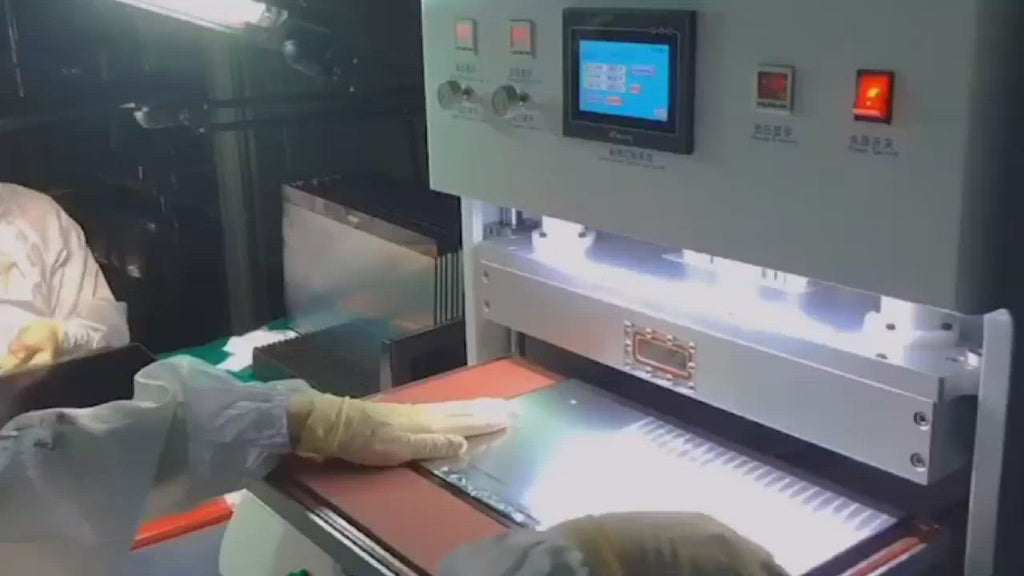
Best Fit: Mixed Phone, Tablet and Larger LCD Work
This setup makes the most sense when the repair room needs a larger lamination area, vacuum extraction, pressure control, heating options, and customized molds. It can support phone work, tablet repair, computer screens, car navigation displays, and other display lamination tasks when the fixture plan matches the panel.
Check Machine DetailsWhen a Smaller Setup May Be Enough
If most jobs are small phone screens, a compact lamination workflow may be more efficient. Less table movement, faster model changes, and simpler training can support steady output. However, the shop should still plan for bubble removal when edge OLED, thicker adhesive, or tablet work appears.
When a Larger Vacuum Setup Makes Sense
If tablets, 12-inch panels, 15.6-inch laptop screens, 27-inch iMac-style panels, car displays, or industrial modules appear often, a larger platform becomes more practical. The screen needs room for safe loading, a stable mold, and enough clearance around the edges. Also, larger panels usually need a more serious inspection routine after cooling.
When Related Large-Panel Planning Helps
For wider or heavier display panels, Jiutu’s Large-Scale Vacuum Lamination Equipment Checklist is a useful next read. It explains why working area, adhesive route, fixture balance, bubble removal, and inspection should be judged as one process.
Project Details to Send Before Equipment Matching
Before choosing a machine, the repair project should be described clearly. Otherwise, equipment selection can become a guess based on screen size alone. Instead, a short technical summary helps match the laminating machine, fixture, air supply, bubble-removal step, and inspection routine.
For example, a 12-inch tablet panel, a curved vehicle display, and a 27-inch computer screen may all need vacuum lamination. However, they may not need the same mold, loading method, pressure sequence, or post-lamination treatment.
Recommended Information to Prepare
- Screen size, glass size, active area, thickness, and diagonal size.
- Phone, tablet, car navigation screen, computer display, or industrial LCD module type.
- OCA film, SCA material, polarizer film, touch panel, cover glass, or full module structure.
- Flat LCD, edge OLED, curved glass, printed border, camera hole, or FPC exit position.
- Daily quantity, weekly model mix, and expected repair rhythm.
- Current defect photos, such as edge bubbles, center air, haze, dust dots, or pressure marks.
- Country, voltage, available air compressor, workspace size, and installation plan.
- Existing equipment, current fixture, sample photos, and any special mold requirements.
Jiutu Product and Factory Support for Repair Workflows
A lamination machine should not be selected as a single isolated item. In actual repair work, cleaning, OCA placement, vacuum lamination, bubble removal, cooling, inspection, and fixture maintenance all affect final yield. Therefore, equipment support should focus on the workflow, not only the model name.
JiutuStore covers phone repair tools, LCD repair machines, optical bonding machines, film laminating machines, bubble removal equipment, polishing tools, and related display repair solutions. This makes the site useful when a repair room needs to compare several process steps in one place.
For specific machine matching, the most useful route is simple: send screen size, screen photos, defect photos, country, voltage, available air supply, installation condition, target quantity, and current equipment details. Then the discussion can focus on fit, fixture, and workflow instead of broad assumptions.
Send Project Details to JiutuFAQ
Is an OCA laminator enough for phone screen repair?
For repeated phone glass repair, an OCA laminator can be enough when the screen size is small, the fixture is accurate, and dust control is stable. However, curved OLED panels, thicker adhesive, or repeated edge bubbles may still need vacuum support and post-lamination bubble removal.
When does tablet repair need a vacuum laminator?
Tablet repair often benefits from vacuum lamination because the bonding surface is wider. Larger glass makes corner lift, trapped air, haze, and dust points easier to see. Therefore, vacuum extraction, stable mold support, and a clear inspection routine become more important.
Does vacuum lamination remove all bubbles?
No. Vacuum lamination reduces trapped air during bonding, but it cannot remove dust, fix a shifted panel, or correct a weak fixture. In many OCA workflows, a bubble remover is still used after lamination to finish small residual bubbles.
How should screen size affect machine selection?
Screen size should be measured beyond diagonal inches. Length, width, thickness, fixture height, cable direction, glass shape, and loading clearance all matter. A panel that fits the plate can still fail if the mold does not support it evenly.
What details help Jiutu match a suitable setup?
The most useful details are screen size, screen photos, defect photos, panel type, glass thickness, adhesive material, daily quantity, country, voltage, air supply, workspace size, and installation plan. Clear photos of the screen, fixture, and defect pattern can speed up equipment matching.
Final Recommendation
Overall, the best setup depends on daily panel mix, fixture support, vacuum needs, bubble-control plan, and inspection standards. A phone-focused repair room may prefer a compact OCA workflow. Meanwhile, tablet screens, computer displays, car navigation panels, and larger LCD modules usually need stronger vacuum lamination planning.
For faster equipment matching, send screen size, product photos, defect photos, country, voltage, available air supply, installation space, daily quantity, and current machine details when contacting Jiutu. With those details, the support team can judge whether the project needs compact OCA lamination, a larger vacuum laminator, customized molds, or a matched bubble-removal step.
- First, record the real repair mix from the past two weeks instead of choosing only by the largest possible screen.
- Next, inspect defect patterns under white, black, gray, and side-light conditions before changing machine settings.
- Finally, send screen size, photos, voltage, country, air supply, workspace condition, and target output before confirming the setup.
A practical equipment discussion can start from the Jiutu OCA vacuum laminator page, then move into screen size, photos, voltage, country, air supply, fixture needs, and expected daily output.